Updated October 21, 2026. A serious security incident involving Rank Math SEO PRO has highlighted an important risk for WordPress site owners: malicious code can sometimes arrive through an otherwise trusted software update.
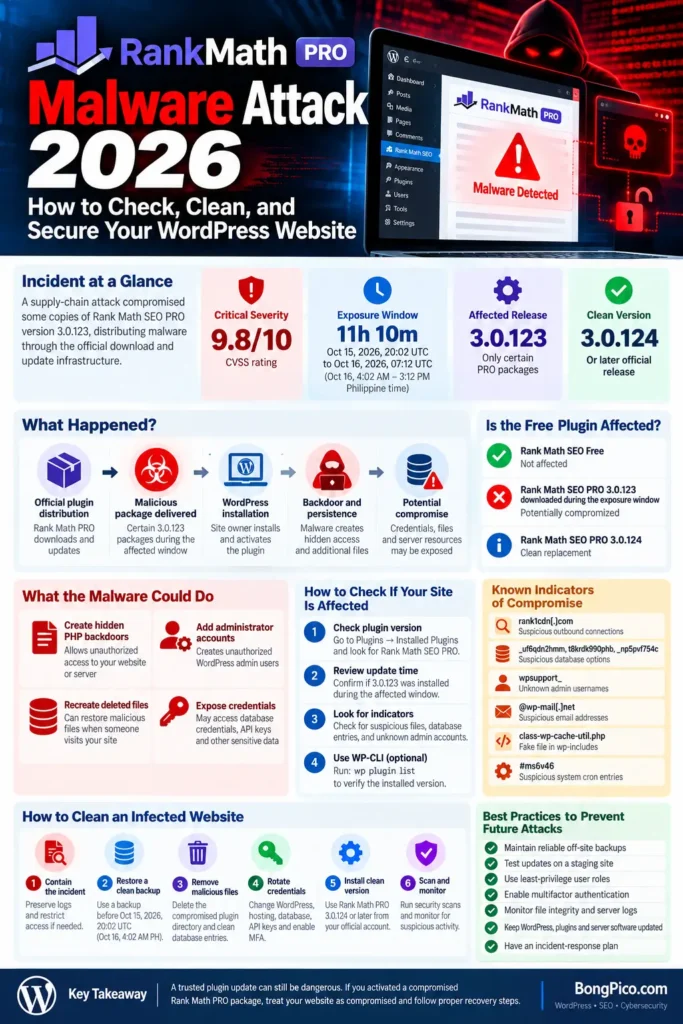
Rank Math disclosed that certain copies of Rank Math SEO PRO version 3.0.123 distributed between October 15 and October 16, 2026, contained malicious code. The affected packages came through the premium plugin’s official distribution infrastructure. The company issued version 3.0.124 as a clean replacement.
Important: If a website installed and activated an affected package, updating the plugin alone may not remove backdoors or other changes the malware made. The site needs an incident-response review and, where appropriate, restoration from a known-clean backup.
Rank Math SEO PRO Malware Attack: Key Facts
| Affected product | Rank Math SEO PRO (premium plugin) |
|---|---|
| Affected release | Certain distributed copies of version 3.0.123 |
| Reported distribution window | October 15, 2026, 20:02 UTC to October 16, 2026, 07:12 UTC |
| Philippine time | October 16, 2026, 4:02 a.m. to 3:12 p.m. PHT |
| Clean replacement | Version 3.0.124 or a later vendor-confirmed clean release |
| Free Rank Math plugin | Not identified as affected by this incident |
| Security reference | CVE-2026-111862 |
Not every installation of version 3.0.123 was necessarily malicious. The installation or update date and the source of the package matter.
What Happened to Rank Math SEO PRO?
Rank Math is a widely used WordPress SEO plugin that helps site owners manage metadata, XML sitemaps, schema markup, redirects, and other search optimization features. Its premium version is typically installed and updated through a vendor-managed distribution channel.
During the reported incident window, some PRO plugin packages contained malicious code. A website owner performing an ordinary update could therefore unknowingly install an altered plugin package.
This is a software supply-chain attack: rather than exploiting each customer website directly, an attacker interferes with software or its delivery process and reaches downstream installations through a trusted channel.
Why This Type of Attack Is Dangerous
WordPress plugins execute PHP code with access to the application’s files, database, and configuration. A malicious plugin can therefore have consequences beyond its own directory, including unauthorized accounts, modified files, persistence mechanisms, and exposure of secrets available to the application.
The vendor’s incident guidance warns that malware-related changes may persist after the affected plugin is updated or removed. That is why a confirmed affected installation requires more than a routine plugin update.
Was the Free Rank Math SEO Plugin Affected?
According to Rank Math’s incident disclosure, the free plugin distributed through WordPress.org was not affected by this particular incident. The concern involved certain copies of the premium PRO release.
| Installation | What It Means |
|---|---|
| Rank Math SEO Free only | No incident-specific exposure identified in the vendor’s disclosure. |
| PRO 3.0.123 obtained outside the affected window | Version number alone does not prove compromise. |
| PRO 3.0.123 obtained and activated during the affected window | Treat as potentially compromised and investigate promptly. |
| PRO updated to 3.0.124 after activating an affected copy | The plugin package may now be clean, but the site still needs an investigation. |
How to Check Whether Your WordPress Website Was Affected
1. Check the Installed Plugin Version
In the WordPress dashboard, go to Plugins → Installed Plugins and locate Rank Math SEO PRO. Record its version and check when it was last installed or updated.
If you manage the site through WP-CLI, run:
wp plugin list --fields=name,status,version,updateOn installations using the standard PRO plugin slug, you can also run:
wp plugin get seo-by-rank-math-pro --fields=name,status,versionRemember: These commands identify versions. They cannot determine whether a particular plugin ZIP was altered.
2. Review the Installation and Update Timeline
Compare the installation or update time with the reported window: October 16, 2026, 4:02 a.m.–3:12 p.m. Philippine time. Check hosting logs, deployment records, WordPress activity logs, update-management tools, and vendor account download history where available.
If you cannot establish the timeline, ask Rank Math support or your hosting security team to help assess the installation.
3. Review Administrator Accounts
Go to Users → All Users and inspect accounts with the Administrator role. Look for unexpected usernames, email addresses, or creation dates.
Using WP-CLI:
wp user list --role=administrator --fields=ID,user_login,user_email,user_registeredDo not immediately delete an unfamiliar account without preserving evidence and verifying whether it is legitimate.
4. Inspect Known Indicators of Compromise
Rank Math’s published incident guidance lists indicators that investigators can check, including suspicious database options, backdoor files, unexpected administrator accounts, and unauthorized outbound connections. Refer to the official Rank Math incident advisory for the current indicator list and cleanup sequence.
For a read-only check of database option names reported in the incident, a developer may run:
wp db query "SELECT option_name FROM $(wp db prefix)options WHERE option_name IN ('_uf6qdn2hmm','t8krdk990phb','_np5pvf754c');"A matching result requires investigation. A query returning no rows does not prove that a site is clean.
5. Check WordPress Core File Integrity
Use WP-CLI to compare WordPress core files against official checksums:
wp core verify-checksumsFor eligible plugins distributed through WordPress.org:
wp plugin verify-checksums --allPremium plugins generally do not have public WordPress.org checksums, so this check cannot validate the Rank Math PRO package itself.
How to Clean an Infected WordPress Website
If a site installed and activated a compromised PRO package, use a structured recovery process. For business-critical websites or installations that handle personal data, involve the hosting provider and an experienced incident-response professional.
Step 1: Contain the Incident and Preserve Evidence
Restrict access to the affected installation where practical. Preserve relevant web server logs, WordPress activity logs, database exports, and file snapshots before cleanup. Coordinate with the host if server-level compromise is suspected.
Step 2: Restore a Known-Clean Backup
The safest recovery route is often to restore both files and the database from a verified backup created before October 15, 2026, 20:02 UTC (before October 16, 4:02 a.m. PHT).
Confirm the backup is genuinely clean before returning the site to production. A backup made after compromise may contain the same backdoors or unauthorized accounts.
Step 3: Remove Persistence Mechanisms
Investigate and remove malicious files, database entries, scheduled tasks, unauthorized administrator accounts, and altered configuration identified by the vendor and your security team. Examine must-use plugins, themes, upload directories, and other locations outside the Rank Math PRO folder.
Do not rely on deleting the affected plugin directory alone. Malicious changes may survive outside it. Follow the vendor’s current cleanup instructions in the recommended order, or have a qualified professional perform the work.
Step 4: Rotate Potentially Exposed Credentials
After containment and recovery, rotate credentials and secrets that the compromised application could access. Depending on the site, these may include:
- WordPress administrator passwords and application passwords
- Database passwords and WordPress authentication salts
- Hosting, SFTP, SSH, and deployment credentials
- SMTP, CRM, payment gateway, cloud, and other API keys
- Credentials reused across other websites or services
Enable multifactor authentication where supported and review active sessions and authorized integrations.
Step 5: Install a Verified Clean Version
Download Rank Math SEO PRO only through the vendor’s official account or approved update process. Install version 3.0.124 or a later vendor-confirmed clean release after the environment has been cleaned.
Step 6: Rescan and Monitor
Run malware and integrity scans, review access and error logs, monitor for unfamiliar administrators, and investigate suspicious outbound connections. Continue monitoring after the website returns to production because persistence mechanisms can be difficult to identify.
How to Protect WordPress Sites Against Supply-Chain Attacks
Keep Tested, Off-Site Backups
Maintain automated backups stored separately from the production server, with enough retention to recover from an incident discovered days or weeks later. Test restorations periodically.
Maintain a Plugin Inventory
For each client site, record plugin names, versions, update dates, subscription ownership, hosting environment, and backup location. This makes it easier to identify exposure when a vendor publishes a narrow incident window.
Use Staging for High-Impact Updates
Test major plugin updates on staging when practical. Staging is not a guarantee against supply-chain attacks, but it allows functionality checks, file comparisons, and security testing before production deployment.
Apply Least-Privilege Access
Limit administrator accounts, enforce multifactor authentication, remove unused access, and avoid sharing credentials across sites. Review which third-party services each WordPress installation can reach.
Monitor Files and Accounts
Use file-integrity monitoring, security logging, and alerts for newly created administrator accounts, unexpected PHP files, unusual scheduled tasks, and changes to sensitive configuration.
Have an Incident-Response Plan
Document who can isolate the site, access backups, rotate credentials, contact the host, and communicate with clients or affected users. For agencies, rehearse the process before a real incident.
Can a Rank Math Malware Infection Hurt Google Rankings?
Potentially, but not automatically. A compromised website may suffer SEO damage if attackers inject spam pages, modify canonical tags or metadata, change redirects, or distribute malicious content.
After recovery, inspect Google Search Console for unexpected indexed pages, security warnings, sudden changes in impressions, and suspicious search queries. Check XML sitemaps, robots.txt rules, canonical URLs, and key page metadata.
There is no basis to assume that every site exposed to this incident experienced ranking losses. The SEO impact depends on what happened on the individual website.
Frequently Asked Questions
Was Rank Math SEO hacked in October 2026?
Rank Math confirmed that certain premium PRO plugin packages distributed during a limited October 15–16 window contained malicious code.
Which Rank Math version was affected?
Certain copies of Rank Math SEO PRO version 3.0.123. The version number alone does not prove that a particular installation was compromised.
What is the clean Rank Math PRO version?
Rank Math released version 3.0.124 as a clean replacement. Use that version or a later vendor-confirmed clean release.
Was the free Rank Math plugin affected?
The vendor reported that the free WordPress.org plugin was not affected by this incident.
Will updating Rank Math remove the malware?
Not necessarily. Backdoors, unauthorized accounts, and modified files may remain after a plugin update. A confirmed affected installation needs investigation and cleanup.
How can I confirm whether my website was infected?
Check the installation timeline, review the vendor’s indicators of compromise, inspect administrator accounts and logs, and use professional malware analysis if needed. No single dashboard check can prove that a website is clean.
Should I stop using Rank Math?
That decision depends on your risk tolerance, the vendor’s response, and your operational requirements. The incident does not mean that every Rank Math installation was compromised.
Final Thoughts
The Rank Math SEO PRO incident shows why WordPress security must go beyond routine updates. Trusted distribution channels can fail, and an attacker who gains access through a plugin may leave changes behind that survive an update.
For potentially affected website owners, the priorities are to establish whether an altered package was activated, contain and investigate the incident, restore a known-clean environment when appropriate, and rotate exposed credentials.
For developers and agencies, the lasting lesson is to keep reliable backups, accurate plugin inventories, strong access controls, and a practical recovery plan.
Website security is not only about preventing compromise. It is also about detecting problems early and recovering with confidence.
Sources and Further Reading
- Rank Math — Official PRO 3.0.123 Security Incident Advisory
- Tenable — CVE-2026-111862
- BleepingComputer — Rank Math Compromised to Backdoor Websites