Passwords are still everywhere in business, but they are also one of the easiest ways for attackers to get in through phishing, credential reuse, and login fatigue. For small teams, passkeys offer a more practical way to strengthen sign-in without asking everyone to become a security expert.
At a basic level, passkeys are cryptographic credentials based on FIDO standards. The FIDO Alliance describes passkeys as credentials tied to a user account on a website or app, usually unlocked with a familiar device method such as biometrics, a PIN, or a screen lock. That matters because users are not typing a reusable password into a login form every time.
For business owners and admins, the bigger reason to care is phishing resistance. CISA says the only widely available phishing-resistant authentication is FIDO/WebAuthn authentication. NIST has also updated its digital identity guidance with a 2024 supplement that discusses syncable authenticators such as FIDO passkeys.
Here is how to roll out passkeys for a small business team using Google Workspace and Microsoft 365, while keeping the process manageable.
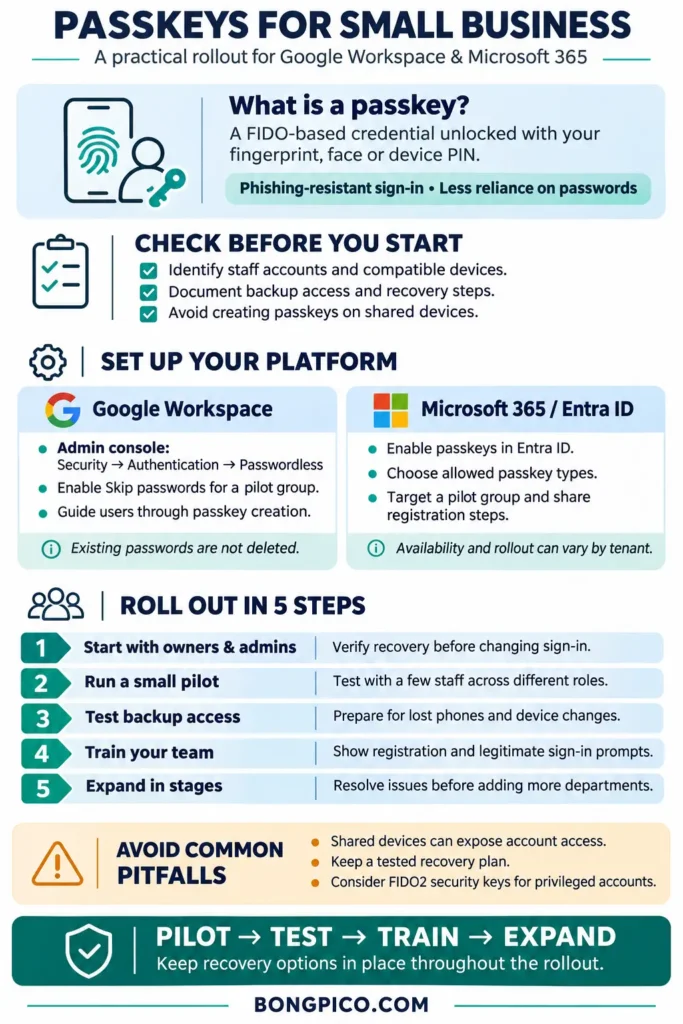
What a passkey is, in plain English
A passkey is not just a renamed password. It is a FIDO-based credential that works with your device’s local unlock method. In practice, that means a staff member might sign in to a work account by approving a prompt with Face ID, a fingerprint, or a device PIN instead of typing a password and then entering a code.
That does not mean every other sign-in method disappears immediately. For example, Google Workspace says admins can allow users to skip passwords at sign-in, but turning that setting on does not delete the user’s existing password.
Why small businesses should care
If your team uses Google Workspace or Microsoft 365 for email, files, admin consoles, or client communication, those accounts are high-value targets. Even a five-person company can be exposed if one mailbox, shared drive, or admin account is compromised.
Passkeys can help because they reduce dependence on passwords and weaker methods like SMS for day-to-day sign-in. They are especially relevant for:
- owners and administrators with privileged access,
- remote teams that sign in from many locations,
- freelancers and agencies managing multiple client accounts,
- small businesses that want stronger login security without adding too much friction.
That said, this is not a magic switch. Official support is real, but not every business workflow will be equally ready on day one.
Before you turn passkeys on
A simple readiness check can prevent lockouts and confusion.
- List which staff use Google Workspace, Microsoft 365, or both.
- Identify shared devices, kiosk-style setups, or borrowed laptops.
- Make sure every admin account has a backup sign-in method and documented recovery steps.
- Decide whether high-risk users should also use FIDO2 hardware security keys.
This caution matters because Google explicitly warns users not to create passkeys on shared devices. If another person can later unlock that device, account access can become a problem.
Google Workspace: how to enable passkeys
Google gives admins a straightforward path. According to Google Workspace Help, the admin setting is in Security > Authentication > Passwordless.
- Open the Google Admin console.
- Go to Security > Authentication > Passwordless.
- Turn on Skip passwords for your whole organization or selected organizational units.
- Tell users to enable skip-password sign-in and create their passkey.
Two details are easy to miss. First, enabling skip-password sign-in does not remove the account password. Second, Google says users do not need to be enrolled in 2-Step Verification to use passkeys for passwordless sign-in in Workspace.
Google also says that users who create a passkey are opted into a passkey-first sign-in experience, but they can switch back to password-first in account settings. Current published device requirements include Windows 10 or later, macOS Ventura or later, ChromeOS 109 or later, Android 9 or later, iOS 16 or later, or a FIDO2 hardware security key.
Practical Google Workspace tip
If your company has separate organizational units for admins and staff, start with the admin or IT unit first. That gives you a pilot group without forcing every employee to change on the same day.
Microsoft 365 and Entra ID: how to enable passkeys
Microsoft’s passkey support is centered on Entra ID. Microsoft Learn says Entra ID supports passkeys stored on FIDO2 security keys, native or third-party passkey providers, and Microsoft Authenticator.
A practical rollout looks like this:
- Enable passkeys in Microsoft Entra ID.
- Choose which passkey types your organization will allow.
- Share registration guidance with end users.
- Prepare users for a more passkey-first sign-in flow if they still depend on SMS or voice authentication.
Microsoft also announced that beginning September 1, 2026, it would start rolling out passkeys as the default authentication experience in Entra ID. The important nuance is that this is a rollout start, not proof that every tenant changed on the exact same date. Microsoft says the experience changes as the rollout reaches each organization.
Google Workspace vs Microsoft 365 at a glance
| Platform | What admins can do | Key caution |
|---|---|---|
| Google Workspace | Enable Skip passwords in the Admin console for the whole org or selected organizational units | Do not create passkeys on shared devices; enabling passkeys does not delete passwords |
| Microsoft 365 / Entra ID | Enable passkeys in Entra ID and choose allowed passkey types | Rollout timing can vary by tenant; users may need guidance if they currently rely on SMS or voice |
Where passkeys can still go wrong
Most rollout problems are not about cryptography. They are about people, devices, and recovery.
- Shared devices: Google’s warning here is clear. A passkey on a shared machine can create access risk.
- User confusion: Some employees may not understand the difference between a passkey, a password manager, and an authenticator app.
- Recovery gaps: Stronger sign-in still needs a backup plan for lost devices, changed phones, or admin recovery.
- Privileged accounts: Some organizations may still prefer hardware security keys for admins and other high-risk users.
The safest approach is to treat passkeys as part of a sign-in policy, not just a feature toggle.
A practical rollout plan for a 5-to-50-person team
- Start with owners and admins. Test the process on the accounts that matter most.
- Run a small pilot. Pick a few users from operations, sales, or marketing before expanding.
- Document backup access. Write down recovery steps and who can approve them.
- Train staff on the prompt. Show what a legitimate passkey prompt looks like on Android, iPhone, Windows, or Mac.
- Expand by department. Roll out in stages instead of company-wide in one afternoon.
For a small business, this staged approach is usually easier to manage than a full cutover. It also gives you time to spot device compatibility issues or user questions early.
Bottom line
Passkeys are no longer a future-only idea. Google Workspace and Microsoft Entra ID both offer real admin controls today, and government guidance increasingly points businesses toward phishing-resistant authentication where possible.
If your company already runs on Google Workspace or Microsoft 365, a sensible next step is not “remove every password immediately.” It is to pilot passkeys on a small set of work accounts, keep recovery options in place, and expand once your team understands the flow.
Done carefully, passkeys can make business logins both safer and less annoying.
Sources
- Allow users to skip passwords at sign-in | User management | Google Workspace Help
- Implementing Phishing-Resistant MFA
- FIDO Passkeys: Passwordless Authentication | FIDO Alliance
- Giving NIST SP 800-63B a Boost: NIST SP 800-63B Supplement for Incorporating Syncable Authenticators | NIST
- Sign in with a passkey instead of a password – Google Account Help
- How to enable passkeys (FIDO2) in Microsoft Entra ID – Microsoft Entra ID | Microsoft Learn
- Microsoft Entra ID security updates: Passkeys are the default authentication method in Entra ID | Microsoft Security Blog
- NIST Special Publication 800-63B