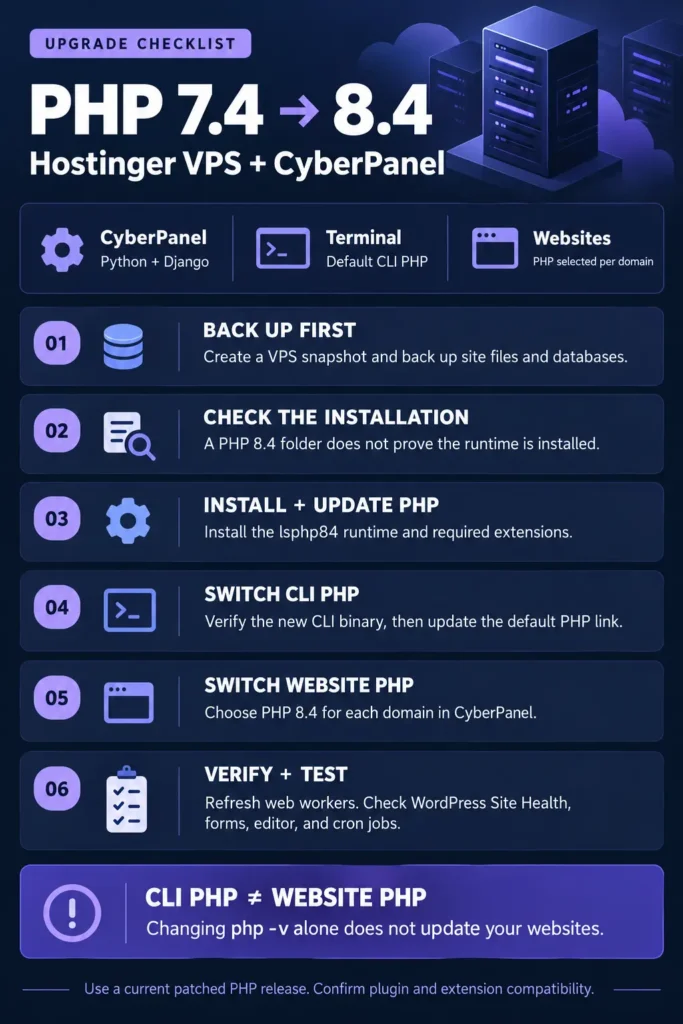
Running php -v on your server and seeing PHP 7.4 can be confusing when CyberPanel already lists newer versions. The reason is simple: your terminal, your websites, and CyberPanel itself do not necessarily use the same runtime.
This guide walks through a real troubleshooting case on a Hostinger VPS running AlmaLinux 9.6, CyberPanel, and OpenLiteSpeed. It covers an incomplete PHP installation, a broken package repository, and switching the default command-line PHP from 7.4 to 8.4.
The goal is to install a working, patched PHP runtime and verify where it is actually being used.
Updated: October 22, 2026. Commands are for the AlmaLinux/CyberPanel setup described here, with root access and the LiteSpeed repository configured. They are not instructions for Hostinger shared hosting or Ubuntu servers.
Why this PHP update matters
On October 21, 2026, the PHP project announced fixes for two critical vulnerabilities, CVE-2026-109618 and CVE-2026-109619, associated with the PHP2Shell reports. Its advisory lists PHP 8.5.12, 8.4.27, 8.3.36, and 8.2.35 as fixed releases. The advisory explicitly includes LiteSpeed among web-serving installations at risk. Use these releases or a later patched release in the relevant branch. [1]
For the upgrade described here, PHP 8.4.27 was available from the configured LiteSpeed repository and installed successfully.
Installing a patched version alongside an older one is only part of the job. A website still assigned to an older runtime will not automatically use the new installation.
Does CyberPanel run on PHP?
CyberPanel’s main application uses Python and Django. Its source code confirms that architecture. WordPress and PHP-based tools managed through the panel are separate applications. [2]
| Component | Runtime or setting |
|---|---|
| CyberPanel dashboard | Python/Django |
The terminal command php | Executable resolved through the shell’s command lookup |
| WordPress websites | PHP handler configured for each website |
| Scheduled PHP scripts | PHP executable specified in the job, or found through its PATH |
| PHP-based utilities such as phpMyAdmin | Their own configured PHP handler |
Changing the CLI PHP default does not upgrade CyberPanel’s Python environment or automatically change every website. CyberPanel updates are a separate maintenance task.
Before making changes
Create a VPS snapshot and a current backup of website files and databases. Record the PHP version currently assigned to each domain. Test the upgrade on staging when available, particularly if the site uses older plugins, custom PHP, or ionCube-encoded software.
The original PHP 7.4 CLI in this case loaded ionCube. Do not assume an equivalent loader exists in the new PHP installation. Check any software that depends on it before switching that workload.
Run the commands below one at a time. When DNF asks Is this ok [y/N], review the transaction and enter y. Wait until the normal shell prompt returns before entering the next command.
Step 1: Identify your operating system and PHP installations
php -v
cat /etc/os-release
ls -d /usr/local/lsws/lsphp* 2>/dev/null
In this case, the output showed AlmaLinux 9.6 and PHP 7.4.33 for the default CLI command. Directories existed for PHP 7.4 through PHP 8.4.
However, a directory is not proof of a complete installation.
Check both PHP 8.4 executables:
/usr/local/lsws/lsphp84/bin/php -v
/usr/local/lsws/lsphp84/bin/lsphp -v
The first checks the CLI binary. The second checks the LiteSpeed binary. If either fails, inspect the installation before assigning a website to that version.
Step 2: Diagnose a missing PHP executable
Both commands initially returned No such file or directory in this case. These checks explained why:
ls -la /usr/local/lsws/lsphp84/bin/
rpm -qa 'lsphp84*'
The directory contained php-config, while the package list included lsphp84-common, database support, development files, and several extensions. The main lsphp84 package was missing.
That distinction matters: updating extensions cannot install a runtime package that is not already present.
Step 3: Update the existing packages and install the runtime
With a working repository configuration, run:
dnf upgrade --refresh 'lsphp84*'
dnf install lsphp84 lsphp84-common lsphp84-mysqlnd
LiteSpeed documents the use of versioned LSPHP packages with DNF on RHEL-based systems. These commands apply that package naming pattern to PHP 8.4. [3]
The installation includes the main runtime and MySQL support. It is not a complete extension list for every WordPress installation. Compare the modules your application needs, including image handling, XML, multibyte strings, ZIP support, caching, and any vendor-specific loaders.
If GhettoForge blocks the installation
The server in this case returned a metadata error for repository gf. Its response included a domain-sale HTML snippet where a repository URL should have been.
This showed a repository problem, not a PHP syntax or WordPress problem. To continue this specific installation while skipping that repository temporarily:
dnf --disablerepo=gf upgrade --refresh 'lsphp84*'
dnf --disablerepo=gf install lsphp84 lsphp84-common lsphp84-mysqlnd
The option applies only to those commands. It does not permanently repair or disable the repository. Review the broken repository separately so future maintenance does not fail for the same reason.
Do not apply this workaround to unrelated repository failures without checking their cause. Keep package signature verification enabled.
Step 4: Verify PHP 8.4 before switching anything
After installation, run:
/usr/local/lsws/lsphp84/bin/php -v
/usr/local/lsws/lsphp84/bin/lsphp -v
/usr/local/lsws/lsphp84/bin/php -m
In the documented case, the version checks reported PHP 8.4.27 for both CLI and LiteSpeed. The module command lists what the CLI environment loads; verify website modules separately after switching the site.
If you see missing-extension warnings, resolve those before moving the affected workload.
Step 5: Change the default CLI PHP from 7.4 to 8.4
First inspect the current command:
type -a php
ls -l /usr/bin/php /usr/local/bin/php
On this server, php resolved to /usr/bin/php, which was a symbolic link to:
/usr/local/lsws/lsphp74/bin/phpThere was no /usr/local/bin/php override. With the PHP 8.4 CLI binary verified, the default link could be changed:
ln -sfn /usr/local/lsws/lsphp84/bin/php /usr/bin/php
hash -r
php -v
The expected result is PHP 8.4.27 (cli), or a newer installed PHP 8.4 patch release.
Only use that link replacement after confirming your layout matches this case. If /usr/bin/php is a regular file, an alternatives-managed link, or a different executable takes precedence, investigate that setup first.
No server restart is required for this CLI link change. New commands using /usr/bin/php use the new target. Already-running processes and jobs explicitly using an older version’s full path are unaffected.
Step 6: Switch and verify each website
In CyberPanel, open Websites → Modify Website, select the domain, choose PHP 8.4, and save. CyberPanel documents PHP as a per-website setting. [4]
For WordPress, check Tools → Site Health → Info → Server → PHP version afterward. The version shown there comes from the environment serving WordPress, which is the relevant check for that site.
You can also inspect PHP handler paths in the OpenLiteSpeed virtual-host configuration:
grep -RniE '^[[:space:]]*path[[:space:]].*lsphp' /usr/local/lsws/conf/vhosts/Treat this as a configuration clue. It may include backup files or omit inherited settings, and it does not prove which binary an existing worker has loaded.
Refresh web workers after a runtime update
Updating files on disk does not guarantee existing PHP workers have reloaded them. LiteSpeed documents a restart marker for detached PHP processes. For a server-wide refresh in a planned maintenance window:
touch /usr/local/lsws/admin/tmp/.lsphp_restart.txt
systemctl restart lsws
systemctl is-active lsws
This affects websites on that OpenLiteSpeed service and can briefly interrupt requests. Verify the service is active and recheck the live PHP version afterward. It does not change a domain still configured to use PHP 7.4. [3]
Step 7: Test the site and scheduled tasks
Check the homepage, internal pages, WordPress login, editor, media uploads, and forms. For an Elementor site, open the editor and preview a page. For an online shop, test the relevant cart and checkout flow in an appropriate test environment.
Review scheduled jobs too:
crontab -lThat shows only the current user’s crontab. Other users, system cron files, and service timers may have their own jobs. A task referencing /usr/local/lsws/lsphp74/bin/php will continue using 7.4 after the default link changes.
If compatibility problems appear, capture the error and fix the affected code or extension. A rollback may restore service temporarily, but it is not a completed security update. Prefer a supported, patched runtime that the application can run on.
Common questions
Why did PHP 8.4 appear installed when its executable was missing?
Supporting packages created the directory structure, but the main runtime package was absent. Checking both the RPM list and actual executables exposed the incomplete installation.
Does changing php -v secure every website?
No. It changes the default CLI command in this setup. Each website must use the intended PHP handler, and its running workers must load the updated runtime.
Does updating WordPress update PHP?
No. WordPress updates its application code. PHP is installed and selected at the hosting or server level.
Can I delete PHP 7.4 immediately?
First check websites, scheduled tasks, utilities, and scripts for dependencies on it. Removing a runtime while something still uses its path can break that workload. Plan removal after migration and verification.
What counts as a completed upgrade?
The intended PHP version is installed, the CLI resolves correctly where required, websites report the patched version, web workers have refreshed, and application functions and scheduled jobs work. A successful package installation alone does not establish all of those conditions.
Sources
- PHP security advisory and release announcements, October 21, 2026
- CyberPanel Python/Django application entry point
- LiteSpeed documentation: Installing and setting up LSPHP
- CyberPanel documentation: Modify Website